Add Gemini AI Prompt to Your Superblocks App
Integrate Google's Gemini AI into your Superblocks app for intelligent chat conversations. This tutorial shows how to set up a Gemini AI bot that automatically responds to user messages.
Prerequisites
You will need:
- A Weavy API key
- A Superblocks account with admin rights
- A Superblocks app with installed Weavy components (see Add to Your App)
- A Google AI Studio account
Step 1: Select Weavy API Key and Backend
Choose your Weavy environment and API key for the Gemini bot configuration.
Step 2: Get Your Gemini AI API Key
- Log in to Google AI Studio
- Create or copy your API key
- Keep this key secure for the next steps
Step 3: Name Your Gemini Bot
Define the bot's identity:
Display name: What users will see (e.g., "Gemini Assistant")
Unique identifier: A unique ID without whitespace, containing at least one non-digit (e.g., "gemini-assistant")
Step 4: Create the Bot in Weavy
Open your terminal and execute this command:
curl WY_BACKEND_URL/api/users -H "Authorization: Bearer WY_API_*" --json "{ 'uid': 'BOT_UID', 'name': 'BOT_NAME', is_bot: true, 'metadata': {'family': 'gemini', 'api_key': 'GEMINI_API_*'} }"
Replace with your values:
WY_BACKEND_URL: Your Weavy backend URLWY_API_*: Your Weavy API keyBOT_UID: Your unique identifierBOT_NAME: Bot display nameGEMINI_API_*: Your Gemini API key
Note: This creates a bot user in Weavy configured to use Google's Gemini AI.
Step 5: Add Weavy Messenger Component
- Open the Add components panel in Superblocks
- Find the Weavy Messenger component
- Drag it onto your page
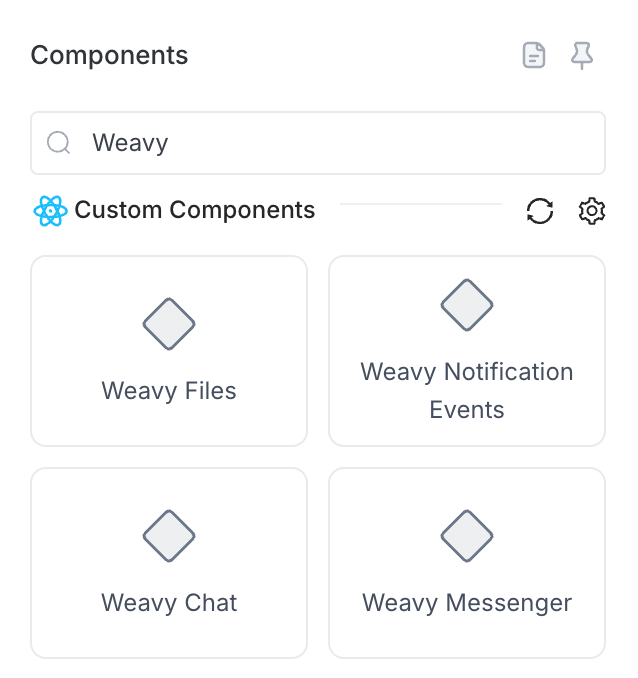
Step 6: Enable Gemini Bot Mode
- Select the Weavy Messenger component
- Locate the Bot mode property
- Enter your bot's unique identifier (your
BOT_UID)
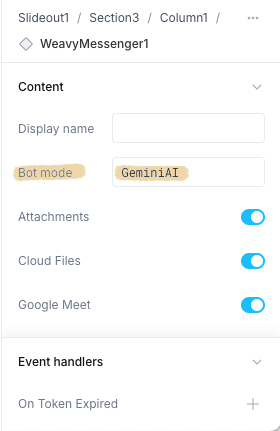
Step 7: Done!
Your Gemini AI chatbot is ready! The Weavy Messenger loads instantly with bot mode enabled and is immediately available to all users.
Users can now:
- Chat with the Gemini AI bot
- Ask questions and receive AI-powered responses
- Experience Google's advanced language model
- Get instant support and information
Production Ready: Your AI chat is fully operational and can be shared with all users immediately.