Create a Refine app with Weavy components
This guide will show you what it looks like to integrate Weavy into a Refine app, quickly get a proof-of-concept up and running, and gain an understanding of what Weavy can do for your Refine apps.
Let's get started!
Prerequisites
We assume you are well acquainted with the Refine API and familiar with setting up a Refine based app.
This tutorial is based on the standard Refine NextJS example using NextAuth with Ant Design.
You will need:
1. Weavy API Key and backend
First we need an API key to communicate with the Weavy backend.
2. Clone the example repo
We have created an example where the Weavy components are added on top of the Refine example.
- Clone the repo.
- Open the example in the repo using your favorite editor.
git clone https://github.com/weavy-labs/refine-weavy-example.git refine-weavy-example
3. Install dependencies
Change your directory to refine-weavy-example and run:
npm install
4. Configure environment variables
To securely handle the Weavy configuration, we provide the environment url and the API key as environment variables.
Create an .env file in the root of your example project and place the Weavy configuration there.
NEXT_PUBLIC_WEAVY_URL="WY_BACKEND_URL"
WEAVY_APIKEY="WY_API_*****************"
Note
- Replace
WY_BACKEND_URLwith the url to your Weavy environment.- Replace
WY_API_*****************with the API key to your Weavy environment.
5. Build
Now, let's compile the project.
npm run build
Developer mode If you want to play with the code, you can run the developer mode instead using
npm run dev.
6. Start
Start the project.
npm start
Once up and running you can open the preview at http://localhost:3000 to see the example in full action.
7. Done!
We now have a complete Refine app running using Weavy components.
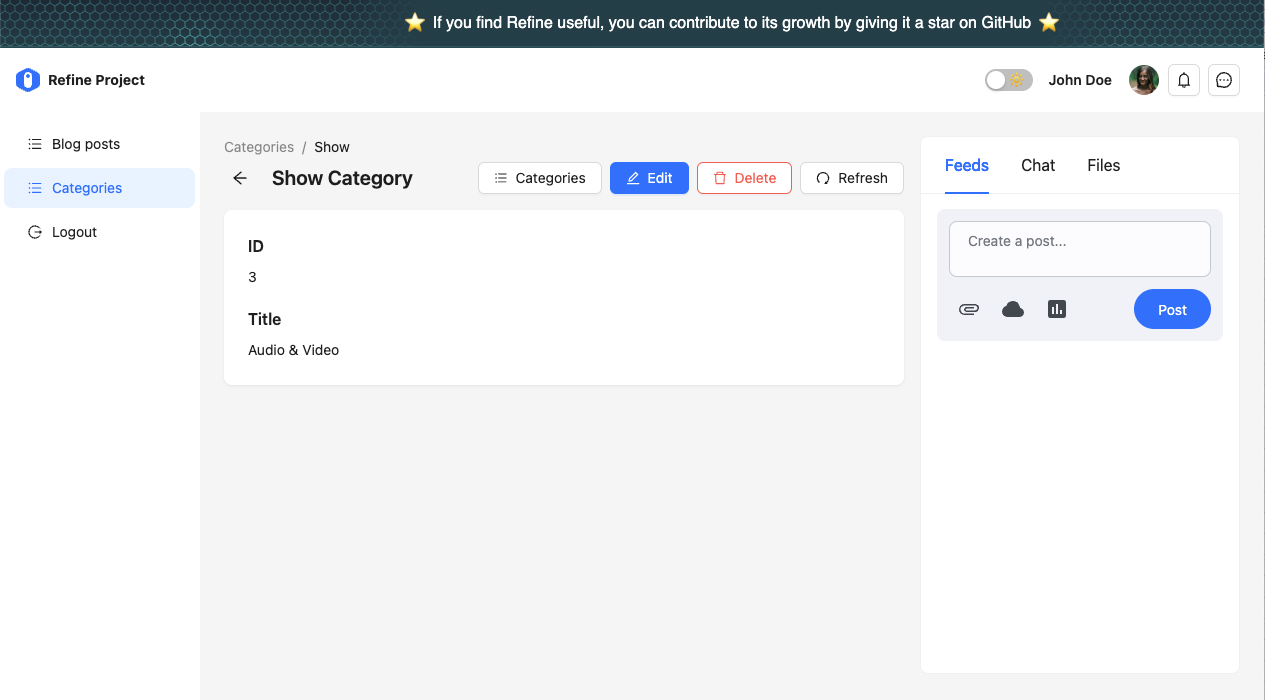
Make sure to explore:
- Seamlessly integrated authentication.
- Notifications available in the top bar.
- Messenger available in the top bar.
- Comments in the blog post view.
- Feeds, chat and files in the category view.
Now, imagine all this in your app!